
© 2026 Tyler Harms
Turns out that when using shards to search multiple cores (shards in general actually) binary is not returned properly. I found an update to the trunk (4.x) version of Solr and was successfully able to update my version of Solr 3.6. I am submitting a pull request of the code update to Solr as well a new war file to eZ Find, but in the meantime you can download the solr.war file on GitHub (it is in my eZ Find branch). Enjoy!
1# Enable Solr to store all the basic information of a content object
2# Allows Solr to be used as a cross-site DB
3[IndexOptions]
4EnableSolrAttributeStorage=true
5OptimizeOnCommit=disabled
When using eZ Find to search a single local site, it does a really good job at building out the result object to be used. What becomes a problem, however, is when a cross-site search is necessary. When the search fetch includes 'as_objects', true() eZ Find tries to build out an object by fetching from the database after the Solr search is completed and the necessary content is returned.
One of the greatest things about eZ Publish as a CMS is its ability to host many websites (siteaccesses) in one eZ Publish install. Recently I had the privilege of working on an eZ install that hosted 4 websites, giving the illusion of a single site experience across multiple urls. We used eZ Find extensively, specifically its multi-core functionality, to get information across the sites with ease. That way, all the sites can keep and maintain their own databases, and what is shared is shared through Solr.
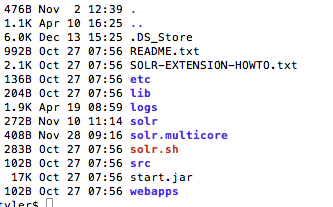
So, to start. Let’s assume that if you are reading this, you already read through my previous eZ Find tutorial (Installing eZ Find). Since we already have our sever up and running there won’t be a lot of work to do there. But, we need to move our config files to the Solr multicore directory. Last time we used the Solr directory, this time we need to use the directory solr.multicore. Inside the multicore directory there are a couple of demo cores for languages. What I did is duplicated the english directory a couple times and renamed them for each site.
As an eZ Publish developer I know that whenever creating an eZ Publish site the cache can be my best friend in production and worst enemy in development. eZpedia has a great article all about clearing the cache.
Clear Cache in eZ Publish / Solution / Root - eZpedia
My favorite is the manually clearing of the cache. For some reason the clear-cache script sometimes misses some files; so the only way you are going to see your changes is by dumping those files manually.
... ➦Very interesting, Bing is on the rise but it appears to be at the expense of Yahoo! not Google.
Despite Bings Rise, Google Still Dominates Search [INFOGRAPHIC].
Alright, so lets begin installing eZ Find by going out and downloading it from the Github => https://github.com/ezsystems/ezfind. eZ Find is an eZ Publish extension so: unzip the download, rename the fold “ezfind,” and then move the ezfind folder to the extensions directory of your eZ Publish install.
So, as with any extension, we have to activate it. Go into your override site.ini.append.php (settings/override/site.ini.append.php) and add ezfind to your active extension list (ActiveExtensions[]=ezfind). I added mine just after my main site extension. Easy enough so far right?
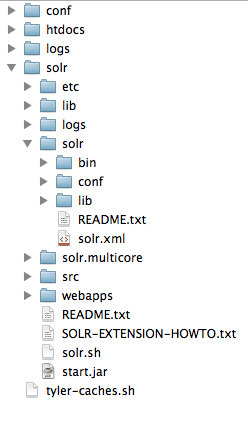
As you had probably already guessed, eZ Find will not without first setting up Solr. Luckily eZ Find comes with the recommended version of Solr for eZ Find. Within the eZ Find extension you should see a java directory (remember Solr is written in Java?). So what we need to do is copy the java directory and move it to the htdocs level of your eZ Publish install and rename the folder “Solr” (see the image on the right). There is a lot in the solr directory that we will not need to mess with right now, specifically I will not cover the multicore options right now, just know that eZ Find can run multiple sites/cores on one Solr install. Also note that I just installed Solr locally, but it can also be installed on remote servers.
... ➦I have been thinking a long time about different topics I could use this blog for. I have settled for the moment on an eZ Publish extension that I have used extensively for a while, eZ Find. eZ Find is an ultra-powerful Solr powered search engine made for eZ Publish, authored by Paul Borgermans.
For starters, an introduction to eZ Find & Solr.
Solr is an ultra-powerful search engine built in Java on top of the Apache Lucene project. It is highly scalable, just like eZ Publish, and can be adapted to work in almost any environment. eZ Find for instance uses a php interface with Solr to perform extremely fast and reliable searches.
... ➦I have been meaning to make this post for a couple of months now. I came across this topic a while back when I was working on creating some custom facets for a website running eZ Find, powered by Solr. The Problem: I needed to bucket all the authors together by last name (eg. A-C, D-F and so on). I also wanted to do this all within Solr, since the book I was using for reference said it was possible and I did not want to use Javascript (I wanted to take advantage of Solr’s speed; let Solr do the work). Now, the book I was using, Apache Solr Enterprise Search Server, was very good at explaining how to do everything when it came to creating my new custom fieldType. Where it was lacking was in how to declare my new synonyms for the SynonymFilterFactory. So for starters lets look at the fieldType:
I ran across a problem recently, I needed to get the contents of a page so that I could mimic a widget’s functionality without having access to the database that said page’s widget used (confused yet). Basically, one site had a widget that displayed an upcoming event (information with came from a database), I needed to copy that widget to another website. Moreover, I did not want to use JavaScript to accomplish my goal because I need the new site to be cached pretty heavily on the server. My first thought was to use cURL, but when I ran curl_exec my function would output the entire page contents onto my new site, something that I did not want, I only wanted a small portion of the website. My next option was to use file_get_contents(“my_url”), as was pointed out to me, this will return the full page as a string. With this I could have accomplished my goal, but not with as much ease as I would hope. I ran into the DOMDOcument() php object a while back and was curious about what I could do with it so I decided to do some research on that. This would eventually lead me to my answer. It turns out that the script is very simple and I can see myself using it quite often so I decided to share it.
Here it is: